
No, MS does not recommend disabling the page file simply because your PC has 32GB of RAM. Windows uses the page file to increase the amount of memory it can commit to applications and to save crash dumps when your PC encounters a BSOD, which is now black on Windows 11. MS says the appropriate size depends on each PC’s peak workload and “can’t be generalized,” which is why Windows manages it automatically by default.
Although 32GB is now common in gaming PCs—and MS called it the “no worries” gaming upgrade earlier this year—several optimization guides and Reddit threads still advise users with 32GB of RAM to disable the page file to free SSD space and improve gaming performance.
Windows 11 Keeps a Hidden Page File Even If You Have Plenty of RAM
The page file is a hidden file named pagefile.sys, which Windows stores in the root directory of the C: drive by default. A simple analogy is to think of RAM as a desk and the page file as a drawer. Windows can move modified data that applications have not used recently into that drawer, freeing RAM for current tasks.
Applications and DLLs already stored on the drive do not usually move to the page file because Windows can reload them from their original files. Only modified data, such as unsaved text in Notepad, may be written to the page file.
Many users check Task Manager for RAM usage, but it also reveals the page file’s broader role. Under Performance > Memory, “In use” shows the RAM currently being used, while “Committed” shows the memory Windows has promised to applications. The displayed commit limit equals the available RAM plus the page file.
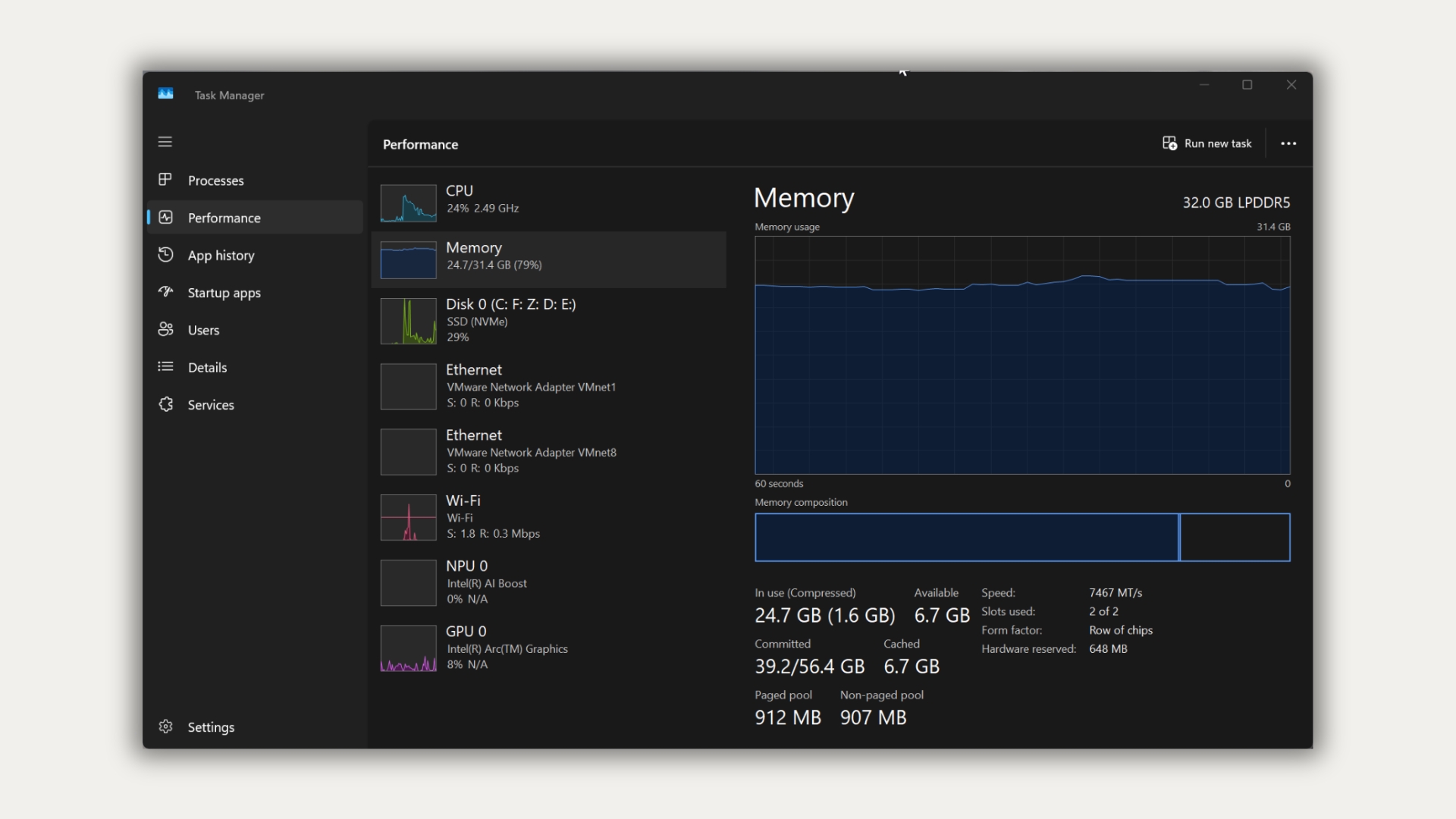
On my 32GB gaming PC, Task Manager shows 24.7GB in use and 39.2GB committed out of a 54.4GB limit. On the 8GB laptop we used to test Windows 11 26H2 this week, the limit was 10GB.
Disabling the Page File Reduces the Memory Windows Can Commit to Applications
Applications often ask Windows to commit memory that they do not need immediately. MS’s Raymond Chen explained in 2009 that a commit “is merely a promise that when you need the page, it will be there.” Windows does not assign physical RAM until the application uses it.
However, every promise still counts toward the commit limit. With the page file disabled, MS says the limit drops to slightly less than the installed RAM. Therefore, a PC with 32GB of RAM cannot commit more than approximately 32GB to applications, even if Task Manager shows several gigabytes of free RAM.
Once the limit is reached, MS warns that applications and the system itself “might not get committed memory,” which “can cause freezing, crashing, and other malfunctions.” Games are no exception. Nixxes, the studio behind PlayStation’s PC ports, advises players who encounter its video memory crash: “We recommend letting Windows automatically manage the virtual memory size.” Egosoft’s troubleshooting page for X4 Foundations also asks players not to restrict the page file.
Mark Russinovich, who co-created Sysinternals and is now MS Azure’s CTO, wrote in 2008 that a few workloads may perform better without a page file. However, a page file generally provides more usable memory, “never mind that Windows won’t be able to write kernel crash dumps without a paging file sized large enough to hold them.”
MS Recommends Letting Windows Manage the Page File, with One Exception
MS’s documentation states that page file sizing “depends on the system crash dump setting requirements and the peak usage or expected peak usage of the system commit charge.” Even two identical PCs may require different page file sizes.
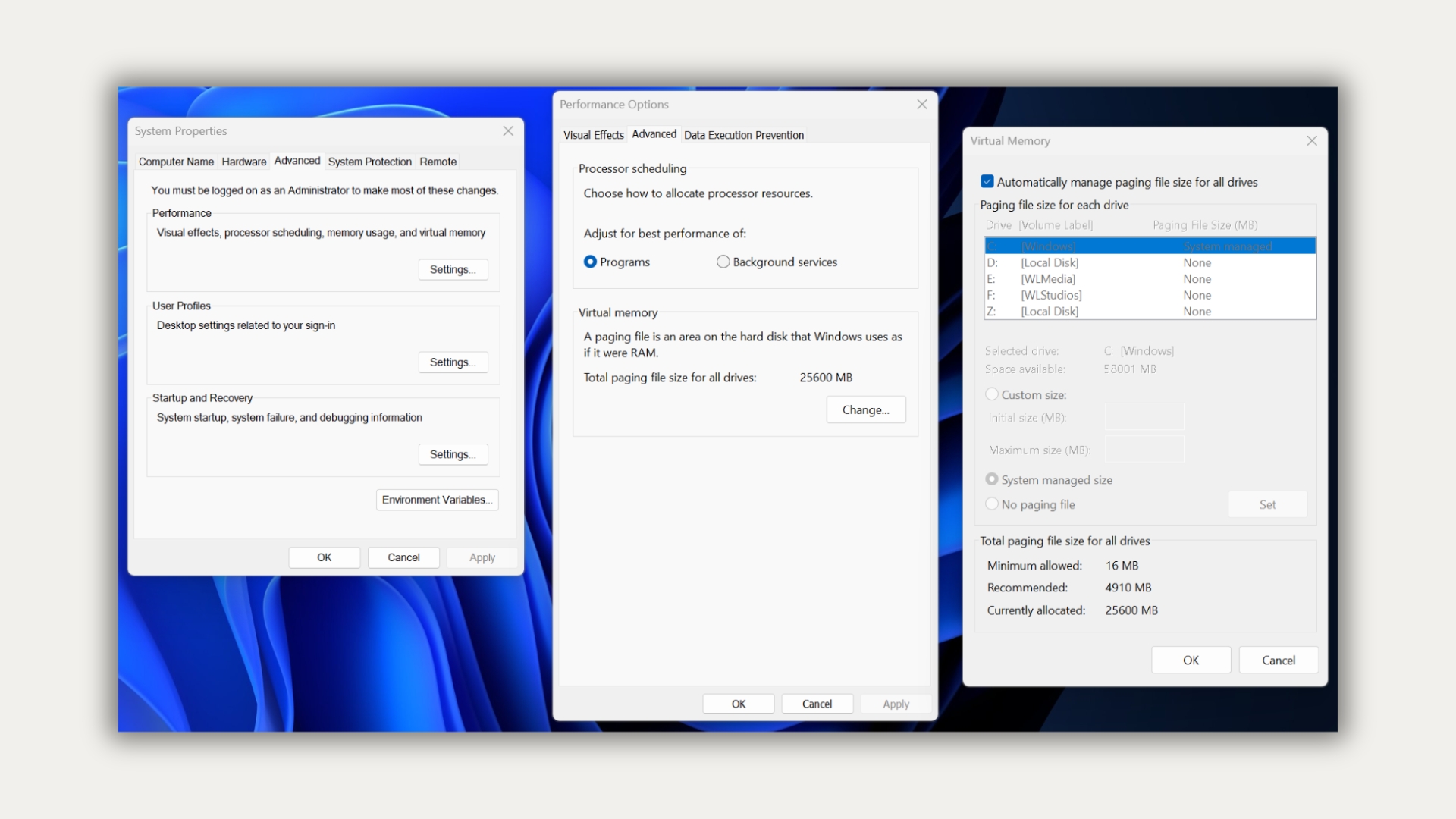
Fortunately, the default “Automatically manage paging file size for all drives” option handles this process. Windows starts with a small page file and expands it when committed memory exceeds 90% of the limit. For a PC with 32GB of RAM, the limit is 96GB—three times the installed RAM—capped at one-eighth of the drive. On a 512GB SSD, that is approximately 60GB.
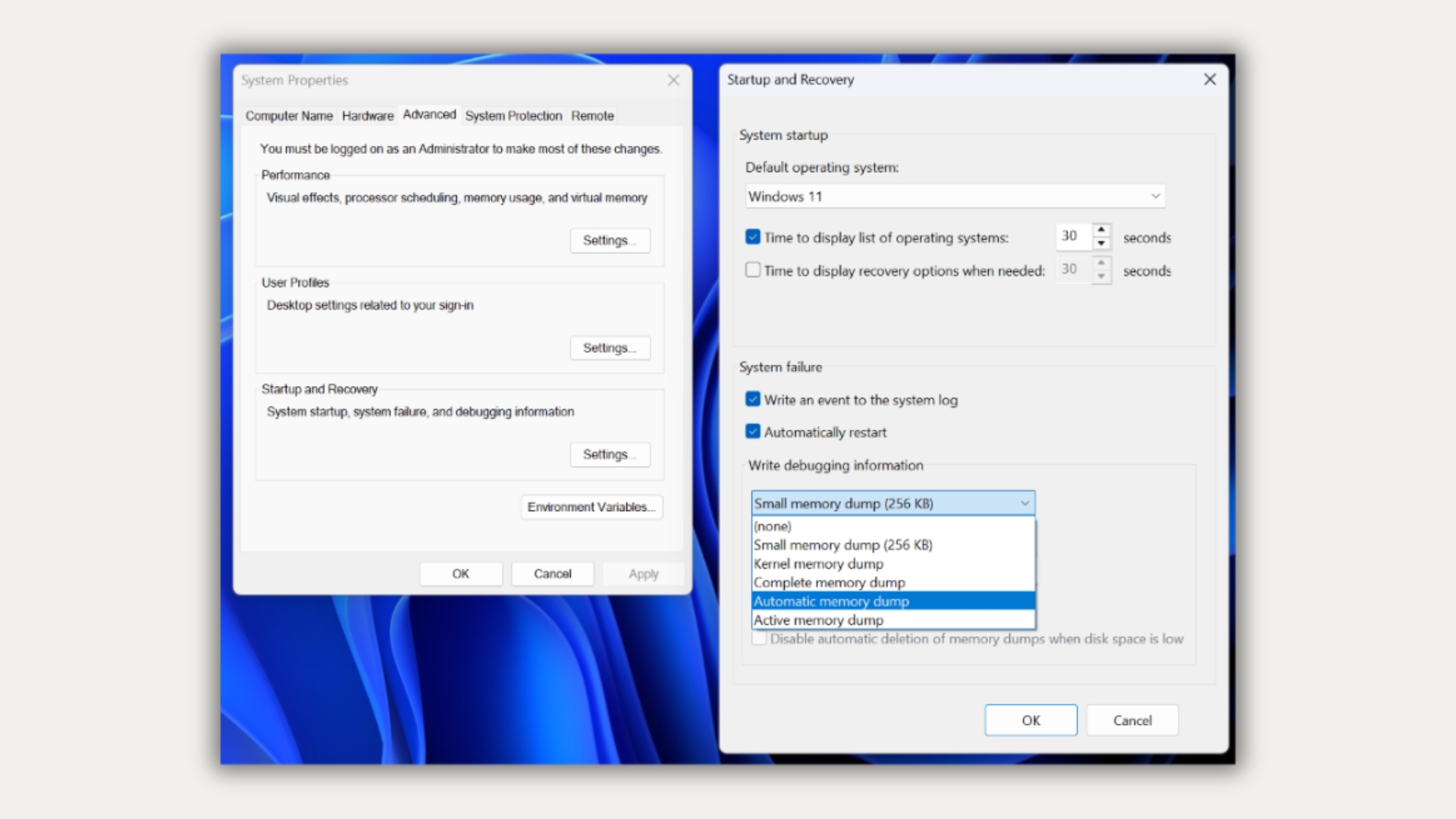
Crash dumps are another important consideration. Windows defaults to an “Automatic memory dump”, which initially requires only a small page file. If the PC crashes again within four weeks, Windows increases the page file to the smaller of the installed RAM or 32GB. As a result, a PC with 32GB of RAM can end up with a 32GB pagefile.sys. Without a page file—or a dedicated dump file that administrators can configure instead—Windows cannot save the crash dump.
MS notes one caveat: applications that allocate memory frequently may encounter random “out-of-memory” errors while an automatically managed page file is still expanding. In that situation, MS recommends using a custom size with the initial size set to 1.5 times the installed RAM.
For power users, Russinovich suggests another method. Run all the applications you normally use at the same time, note the peak commit charge—Process Explorer displays it under System Information—and subtract the installed RAM. If the result is negative, size the page file according to the crash dump setting.
Does Disabling the Page File Improve Gaming Performance on a 32GB PC?
If peak committed memory remains well below 32GB, Windows has little or no reason to write to the page file while a game is running. Therefore, disabling it is unlikely to provide a meaningful performance improvement. However, doing so removes the safety net available when a game, several dozen Chrome tabs, and Discord collectively push memory usage beyond that limit.
MS also says that a page file showing 100% usage is not necessarily a performance problem, provided the commit limit has not been reached. Additionally, not every hard page fault represents a page file read. Windows also counts reads from EXE and DLL files as hard faults. Consequently, game stuttering does not automatically mean that Windows is moving RAM contents to the SSD.
On my PC, the system-managed pagefile.sys occupies 25.6GB, which represents the total SSD space I would recover by disabling it.
If your 32GB PC is running properly, the page file is one Windows setting you do not need to optimize. Have you ever disabled the page file on your gaming PC?
Windows Latest depends on readers like you. Make us your Preferred Source on Google Discover and Google Search, and help our independent reporting reach more people.
