Why You Should Consider Turning Off “Get the Latest Updates as Soon as They’re Available” in Windows 11
If you’ve enabled the “Get the latest updates as soon as they’re available” toggle on the Windows Update page, you might want to reconsider. This feature can sometimes install updates that are unnecessary for your PC, including out-of-band (OOB) patches intended for specific devices, such as the recent emergency update for certain Dell PCs.
The Dell Incident: A Cautionary Example
After the July 2026 Update, some Dell PCs experienced significant performance and overheating issues. MS acknowledged the problem and promptly halted the update for affected devices. On July 18, an emergency update (KB5121767) was rolled out to address these overheating issues specifically on Dell PCs.
MS clarified that this out-of-band update is not required for all devices. “A limited number of Dell devices that were temporarily prevented from receiving the July 2026 security update (KB5101650) can now install this OOB update [KB5121767],” MS noted. “This OOB update is only recommended for devices affected by this issue. If your device is not affected, no action is required.”
Despite this, some users found the update automatically queued for installation because they had enabled the “Get the latest updates as soon as they’re available” toggle—even when they didn’t own a Dell PC. This highlights the unintended consequences of enabling the feature, as MS has stated that the update won’t harm unaffected devices but is unnecessary for them.
MS’s Rare Warning
In a statement, MS explicitly reminded users that out-of-band updates will install automatically if the toggle is enabled. This is a rare move by the company, which also emphasized that users can still receive all required updates without needing to turn on the toggle. This incident serves as a reminder to carefully manage your Windows Update settings to avoid surprises.
What Is “Get the Latest Updates as Soon as They’re Available”?
The “Get the latest updates as soon as they’re available” toggle is not new and has been available on Windows 10 PCs as well. It was introduced to address the slow rollout of new features under a process called Controlled Feature Rollout (CFR).
With CFR, MS gradually rolls out major updates and features to a smaller group of users. This controlled approach helps identify and fix potential issues before a full-scale release. However, it has also frustrated users who feel even minor bug fixes are unnecessarily delayed by this process.
The toggle was introduced to grant users more control over gradual rollouts. Enabling it prioritizes your PC in MS’s rollout process, allowing you to receive updates, including bug fixes, earlier than others. However, it also enables installation of optional updates that may not be necessary for your PC.
According to MS, “After you set the toggle to On, your device will be among the first to get the latest non-security updates, fixes, improvements, and enhancements at the time they’re available for your device. You only need to set this option once, and it stays on.”
Unintended Consequences of the Toggle
While the toggle can be convenient for users eager to access new features, it can also lead to the automatic installation of updates that are unnecessary or potentially problematic for your device. This is particularly relevant in cases like the Dell incident, where an optional update caused significant issues for affected devices.
Who Should Turn Off “Get the Latest Updates as Soon as They’re Available”?
If you prefer to avoid automatic installation of optional updates, such as out-of-band emergency patches or cumulative preview updates, it’s best to turn off this feature. The Dell incident demonstrates the potential risks of enabling the toggle, as affected users may have avoided overheating and performance issues if they hadn’t received the optional update automatically.
While the toggle is useful for those who want early access to updates and know how to manage potential risks, it’s not necessary for everyone. If you prefer to only receive essential updates, disabling the toggle is a safer option.
How to Turn Off “Get the Latest Updates as Soon as They’re Available”
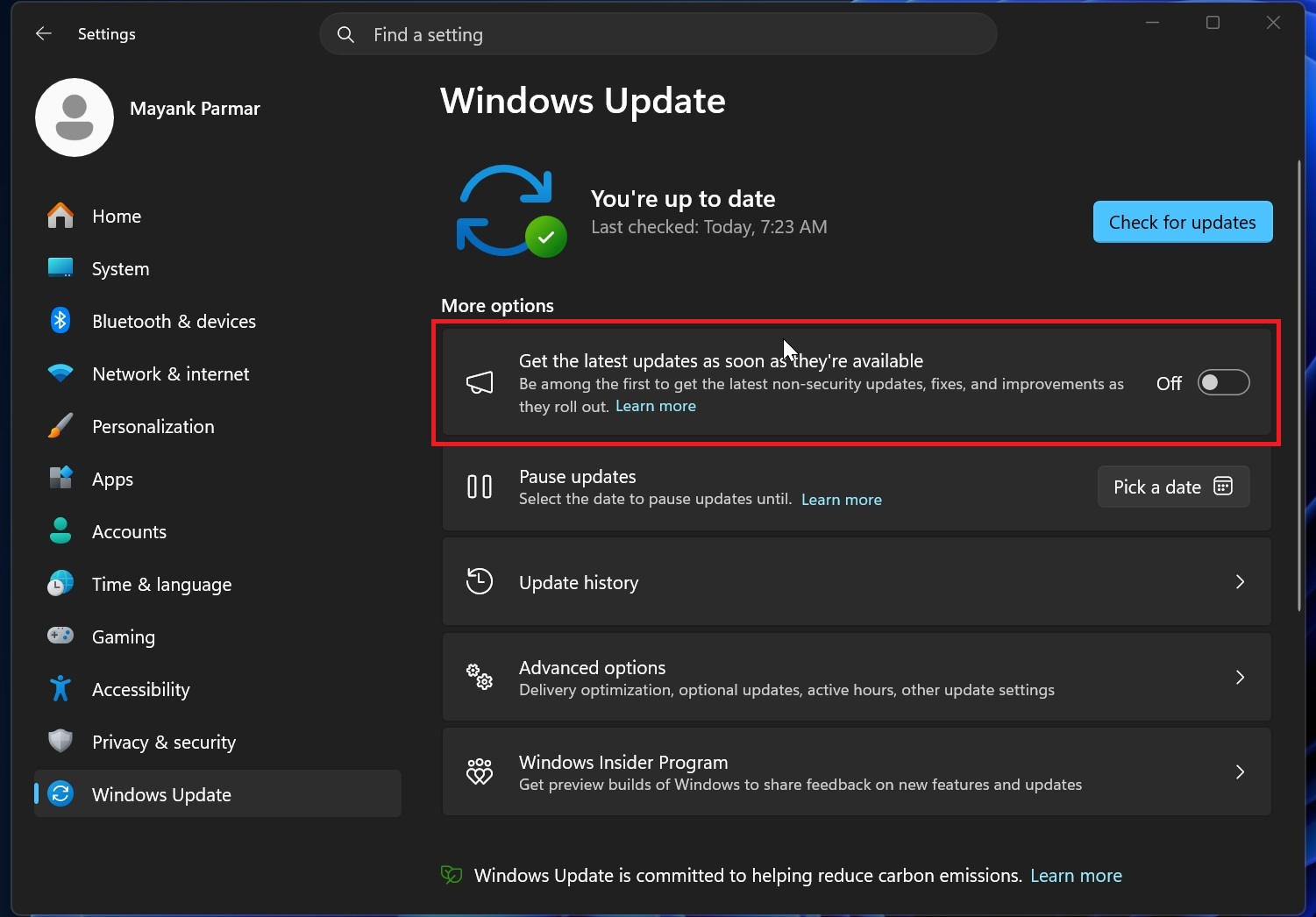
To disable this feature, follow these steps:
- Open Settings.
- Navigate to Windows Update.
- Turn off the “Get the latest updates as soon as they’re available” toggle.
Once disabled, you will still receive critical security updates, but Windows will no longer prioritize your PC for optional updates, new features, or out-of-band releases.
Final Thoughts
While the “Get the latest updates as soon as they’re available” toggle can be beneficial for users who want to stay ahead with the latest features and fixes, it’s important to understand its implications. For those who prefer a more cautious approach to updates, disabling this feature is a reasonable choice. Ultimately, managing your Windows Update settings carefully can help you avoid unwanted surprises.
Windows Latest depends on readers like you. Make us your Preferred Source on Google Discover and Google Search, and help our independent reporting reach more people.
